Saturday, August 1, 2020

Cybersecurity and the Pandemic

TLDR: In the face of a pandemic, we were not ready as a society from a cybersecurity standpoint

March 13, 2020, was my last full day in the office. The coronavirus was threatening to continue spreading like wildfire and, like many governmental organizations in the United States, parts of the federal government began to take action. That Friday, I was sent home with my work laptop in tow and told to get settled to work from home; how long, no one really knew. In the days and weeks that followed, we all began trying to figure out how to operate under this, "new normal."

In organizations that rely on daily interaction to conduct meetings and just generally check on the welfare of their employees, it can be difficult to transition. They must find new ways to navigate through the daily schedule. We found many ways to interact with each other, starting with Zoom, and then finally falling into a Department of Defense-approved system, Commercial Virtual Remote (CVR) Environment. With this new way of operating, there were some struggles.

As we began to utilize Zoom, murmurs began to arise about the security of the platform. Schools were being hijacked by pranksters hopping into rooms and disrupting classes. Additionally, it came to surface that data from Zoom was actually being routed through China; a serious concern for us in the federal government. The Department of Defense quickly put a kibosh on the use of Zoom for "official use" and quickly opened up the CVR platform; essentially, a Microsoft Teams environment. It was a trying time for us and many more organizations, I imagine, went through the same type of scenario. Thus, it begs to ask the question, were we ready?

The Zoom platform is pretty amazing. The videoconferencing capabilities it provides is excellent and allowed us to have everybody in the same virtual room at the same time to conduct our weekly staff meetings. I even utilized it to keep a "virtual office" open for anyone who might need to reach me and wanted to do it as close to a personal interaction as possible. However, it was clear, from all of the news that came out as the pandemic began to perpetuate, that a platform like this was not ready for mainstream usage.

As Zoom use exploded, many people jumped into the water, head first, without a life jacket. There were security features, such as room passwords and waiting rooms, but many people did not use them. This left them vulnerable to the hijackings experienced by the schools. People believed that, without the meeting ID, there was no risk. However, a program called zWarDial was developed by researchers that could guess roughly 100 correct meeting IDs per hour. And, with no passwords to protect them, anyone could join in on the conversation.


The problem with moving to a platform like Zoom in an off-the-cuff, spontaneous manner is that we are just not ready. Too many organizations and individuals have put cybersecurity on the back burner for too long. And, in a time of need, like we saw as the pandemic kicked off, the door is left ajar for malicious actors to enter and wreak havoc. In the case of Zoom, they quickly moved to educate users on the security features; but, this should have been done ahead of time, with planning.


Organizations and individuals need a contingency plan in place. What are you going to do if your daily operations or daily lives are upended? If that contingency plan includes some form of information technology, there needs to be a plan in place on how to use it effectively and securely. The Zoom case is a prime example of why this needs to happen. Furthermore, it is not just the organizations and individuals who need to prepare, but also the developers of the technology.


Concerning is the idea that Zoom was pushing data through China without anyone’s knowledge. They only admitted it after it was identified that encryption keys between the United States and Canada were being routed through China. Granted, Zoom admitted fault in its geo-fencing process to keep data in the regions it was being transmitted, but this still provides evidence that some technology developers just are not ready for mainstream usage within organizations.


We need to do more as a society to increase our knowledge of cyber threats and malicious intents. Not only do organizations have a dire need to secure their systems, but personal devices need to be considered as well. In today’s world of data breaches and espionage, it can only take one small incident to create a much larger problem. We must do more to educate everyone on best practices for securing data and devices.

Sunday, July 26, 2020

Electronic Logging Devices: An Interesting Cybercriminal Target

TLDR: Unchecked cybersecurity requirements leave the commercial motor vehicle industry vulnerable to attack

Photo: Pexels.com
Greg Grisolano, a writer or Land Line, wrote a post regarding electronic logging devices (ELDs) and an FBI bulletin regarding their security. If you are like me and do not know what an ELD is, let me give you a quick background. An ELD is a device that records engine activity in a vehicle. The U.S. Department of Transportation, through the Federal Motor Carrier Safety Administration, mandates that commercial motor vehicle drivers who are required to log hours must use an ELD. Essentially, it is an electronic log of a driver's on and off-duty record. Simple enough, right? So, what concern does the FBI have with security?

The ELDs allow connectivity via cellular, Bluetooth, and satellite communications, depending on the model being used. These devices connect into the electronic control module (ECM) of the vehicle to track things like vehicle identification, hours on the road, how many miles have been driven, and the vehicle's location. If you have ever taken your car to the dealership for a diagnostic evaluation or, perhaps, you have used a system like Verizon's HUM, then your vehicle's ECM has most likely been used at one point in time. 

According to the FBI, many of these ELDs have gone through a self-certification process, not an industry-standard certification. This means the manufacturer of the device has given its own devices a clean bill of health. What the FBI has discovered is that most of these self-certified devices do not follow any cybersecurity standards to prevent attacks or mitigate vulnerabilities. This leaves these devices open to the threat of a cyberattack. So, why would a cybercriminal want to attack an ELD on a truck hauling goods from Walmart's distribution center in Bethlehem, PA, to a store in, say, Omaha, NE?

An ELD (Photo: PeopleNet)
Some of the ELDs the FBI tested showed they provided more advanced options than their intended use. The intention is to simply log information. However, some of the self-certified devices actually provide the ability for the device to send commands to the vehicle's engine. Thinking like a malicious actor, how amazing would it be to have your name on the marquis on the dark web when you bring the trucking community to a screeching halt by shutting down all vehicles utilizing a compromised device? It may sound far-fetched, but it is a real possibility.

The biggest concern, however, concerns the connectivity to the outside world. From a cybersecurity standpoint, this is a huge vulnerability. An attacker could, in theory, target a vehicle utilizing the wireless, Bluetooth, or satellite communication channel on the ELD. Once inside the vehicle’s system, the attacker could then work to gain access to additional networks or systems. These could include enterprise-wide systems such as vehicle tracking; customer databases; personal information for drivers, employees, and customers; or even financial data. In the eyes of the FBI, the door is wide open for a large-scale event. So, how did ELDs become so vulnerable in the first place?


When the DOT and FMCSA mandated the use of these devices, they did nothing to require standards with regards to cybersecurity or quality assurance. Thus, there was no baseline for vendors to follow in order to certify their devices. Rather, they simply made sure they achieved a performance standard, logging all of the required information, and then sold them to commercial motor vehicle organizations to implement. This opens many proverbial doors for would-be attackers.


The FBI alert is a warning to those who use these devices. They urge users to reach out to the vendors to see what is being done to enhance the security of the ELDs. Interestingly, the DOT released cybersecurity best practices for these devices in May 2020, but they appear to just guidelines for the manufacturers to follow. It does not appear that there is any requirement for them to do so.


It is interesting, in our ever-connected world, the doors we can leave open to intruders. We are adding so many devices to our “Internet of Things” each day and, in doing so, only increase the attack surface on society. From a cybersecurity standpoint, we need to do better and enforcing strict requirements and testing to seek out vulnerabilities, fix them, and shut the door on would-be criminals. Our desire to have information at our fingertips, at a moment's notice, in an automated fashion continues to drive our need to ensure such data and information is secured; not just when called out by the FBI but from the very beginning.


Tuesday, July 21, 2020

Controls and Benchmarks: Necessary Evils

TLDR: Controls and benchmarks, while appearing to be cumbersome to some, are necessary evils in today's IT environment.

Figure 1 - CIS Controls
Benchmark, as it relates to computer systems, is defined as, "a standardized problem or test that serves as a basis for evaluation or comparison." In the world of information technology, there are various benchmarks available. You can test your office computer to see if it can efficiently run various administrative programs. Or, perhaps, you would like to see where your newest gaming computer ranks among other testers. The most important benchmarks, in my opinion, are those developed by the Center for Internet Security (CIS).The overall mission of CIS is to make the information technology world better for everyone; governments, schools, municipalities, businesses, individuals, etc. They do this by providing controls and benchmarks. The easiest way to visualize these is control = policy and benchmark = evaluation.

20 controls have been developed by CIS based on real-world attacks and defenses which have worked effectively against those attacks. You can look at controls as after-action items that have feasible solutions. They are broken down into three categories: basic, foundational, and organizational (Figure 1).

An example of a control is the basic control of Inventory and Control of Hardware Assets; the first control listed. Under this control, the organization should do several things regarding devices. Among these are: utilize an active discovery tool (identify security function), address unauthorized assets (respond security function), and deploy port-level access control (protect security function). The CIS provides guidance on what these controls are for but leaves it up to the organization to determine how to properly implement them.

Figure 2 - An Ubuntu Benchmark Setp
Benchmarks are not controls; however, they are closely related. While the controls provide guidance on what an organization should be doing to protect its information technology assets, the benchmark provides direction on how to secure assets. For instance, CIS provides a benchmark for securing systems running Ubuntu Linux 18.04 LTS (Figure 2). Following through the benchmark allows the organization to implement know best practices for assets. Again, these are based on information gathered from attacks and what has effectively worked well against such attacks.

Controls and benchmarks are necessary evils in today's information technology-driven world. An organization utilizing controls and benchmarks, best practices to secure information systems, stands a much better chance of thwarting off an attack than one which does not. Controls are the mechanisms by which an organization can implement policies to protect assets and the benchmarks are there to make sure those assets are secure.

Sunday, June 28, 2020

Personal Health Data, the Dark Web, and Protecting Information

Credit: https://www.managedhealthcareexecutive.com
TLDR: Personal health information is a valuable target for the dark web. Organizations must do more to protect it.

During class this week, the topic of the Health Insurance Portability and Accountability Act of 1996, commonly referred to simply as HIPAA, came up. The primary topic of the discussion was about the vulnerabilities to organizations using HIPAA information and the penalties for violating the Act. I have had discussions about HIPAA in previous cybersecurity classes, but I never really delved into the "why factor" surrounding patient records until now. It is quite intriguing to know why an individual's records are so important to a hacker.

In the article, "Research Reveals Why Hacked Patient Records Are So Valuable," by Marianne McGee, she discusses this very topic. This article introduced new terms for me: fullz and identity kits. A fullz, slang in the dark web world, is a term used to describe an individual's full health history. This can be intricate records of health issues and also include such things as the pharmacy a person utilizes. These can be purchased on the dark web for as little as $20 and then turned into identity kits.

Credit: https://www.freepik.com/
An identity kit is a combination of lots of information farmed about an individual off of various venues and then combined with health data. These venues can be from websites, phone calls, and any other method an attacker can use to get information. A key part of completing these kits is social engineering. Perhaps an attacker has your medical data and contact information but needs just a few more details to put everything together. You might start seeing emails or receiving phone calls asking you to verify data that the attacker needs to put the pieces of the puzzle together. Once complete, attackers can then sell the identity kits on the dark web for thousands of dollars to other entities who can then use those kits to still the individual's identity. Scary thought, right?

An even scarier thought is that, according to Carol Amick, 70% of organizations are not compliant with HIPAA. Now, this does not necessarily mean that 70% of organizations are vulnerable to attacks, but that is a large number of organizations handling patient medical information who do not meet compliance to safeguard such information. An even scarier thought: it may only take one organization to cause havoc for millions of people.

In 2014 and 2015, Anthem Health was the target of a spear-fishing campaign. This attack resulted in the compromise of personal information for 80 million individuals. An attack of this magnitude as the result of a spear-fishing campaign shows that organizations, especially those with highly valuable personal information, must do more to combat vulnerabilities. These types of attacks will only get more sophisticated and look more authentic, so organizations must step up their defenses and train employees to be cognizant of organizational policies in place to prevent such compromises.

The Anthem Health case was considered a sophisticated attack. The attackers appeared to have full access to systems they should not have. The likely culprits, in this case, could have been malware or a response to login credentials. They were able to gain access to the organization's databases and run queries from some time in December 2014 until January 29, 2015, when the last noted query was performed. In reality, the Anthem Health breach was not actually a HIPAA violation since no actual medical records were stolen. Rather, full names, birthdates, social security numbers, and employment information, among others, were the target of the attackers; some of the needs for identification kits.

Anthem Health is just one case of an organization being compromised through malicious activities. As we move forward storing and transmitting more and more personal information across the Internet, it is imperative that organizations take stronger initiatives to safeguard this highly valuable data from falling into the hands of dark web constituents. Leadership at all levels of an organization dealing with such information must do everything in its power to protect individuals who have entrusted them to safely handle their personal information. This could be accomplished through stricter adherence to HIPAA standards, revamped training initiative for employees, and, where Anthem failed, encrypting such data to further protect it. Furthermore, IT departments can leverage strict spam and traffic filters to prevent malicious links from entering the organization and, if they do, prevent any damage by highly limiting traffic to suspected websites.

Will we ever eradicate malicious attacks? It is highly unlikely. However, through proper education of employees and strict enforcement of acceptable use policies within organizations, we can certainly make it harder. Organizations that work with highly sensitive information, regardless of who it might affect, must take steps to prevent breaches like the massive Anthem Health example from occurring. They only way they can is to make it harder for employees to unknowingly open the door to attackers and constantly monitor their systems for any sign of malicious activity. Anthem Health went for nearly a month before employees noticed something strange. That was nearly a month too long for something like this to have been occurring.


Sunday, June 7, 2020

A Non-Rambling Discussion on Threat Modeling Approaches (CYBR 650, Blog #1)

TLDR: Threat modeling comes in a variety of approaches. Knowing what you are trying to protect can help steer you to a more appropriate method.

Unless you are vehemently against technology, you have used it at some point in your life. Perhaps you have a cell phone, a laptop computer, or, for most of us, have used a debit or credit card. Our lives, the organizations we work for, and the businesses we patronize all thrive on technology. With the explosion of technology to help make life easier for civilization, it is also imperative for us to continually remember there are those out there who want to inflict harm. This is where threat modeling can help an organization protect itself and, to some degree, individuals as well.

In his book, Threat Modeling: Designing for Security, Adam Shostack provides three primary approaches to threat modeling: asset, attacker, and software. Each of these three methods focuses on different areas of threats and how to mitigate, eliminate, transfer, or accept the associated risks. Now, it is certainly not feasible that individuals would perform construct a threat model for each new technology they add to their pocket or household, but some of these things should come to mind. Organizations, on the other hand, must perform threat modeling for each asset and system added to the inventory. While each model has its pros and cons, it may really come down to a mixture of all three approaches. Let’s look at each to see why that might be the case.

Image credit: BizNews
Asset-centric threat modeling means putting emphasis on what you value and then looking at the vulnerabilities associated with those assets. From a personal perspective, this could be looking at what threats you have to accessing your bank account information online. Can your password be stolen and used to long into the banking application? From an organizational perspective, this could be protecting a database full of client records. What threats exists to this data and how can we further protect it? The focus here is on what one values.

Image credit: FitDay
Attacker-centric threat modeling focuses on what an attacker might do. Instead of looking at assets to protect, this approach looks at the various tactics and techniques an attacker might use to attempt to gain access to an asset. If you think like a burglar when looking to protect your home, you might install a second lock on the door or find better ways to secure your windows. On the organizational side, this can include things like focusing on a list of usernames and passwords for critical systems. Perhaps you want to check these credentials to make sure they cannot be easily cracked. Again, the thought here is to consider, “what would an attacker do?”

Image credit: InformationAge
The last threat modeling approach Shostack discusses is that of a software-centric approach. This approach is focused on dealing with software and systems being deployed within an organization. On the personal side, you can think of this as installing software on your laptop or even your smartphone. You certainly do not want to install anything which would let someone have access to your personal information. Likewise, organizations need to use this approach to look for holes which may allow attackers to gain access to their assets. If software is being deployed within the organization, are there concerns which may open up vulnerabilities on the computers or networks critical to the organization’s operations? These are things to consider when using a software-centric approach to threat modeling.

Image credit: DZone
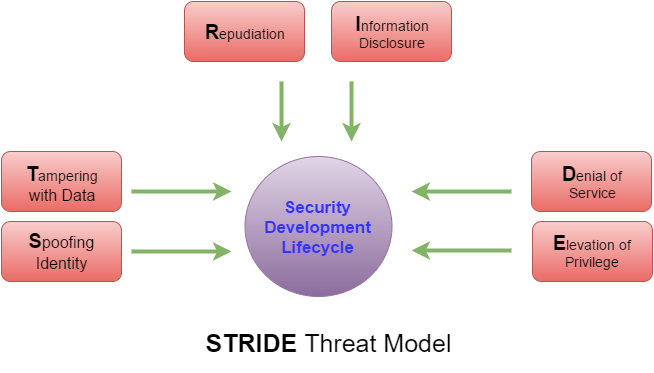
Another threat modeling approach is STRIDE. STRIDE stands for spoofing identity, tampering with data, repudiation, information disclosure, denial of service, and elevation of privilege. This approach really pertains mostly to information systems but can be thought of with other threats as well. Shevchenko points out that this approach was invented in 1999 and adopted by Microsoft in 2002. Knowing that this applies primarily to information systems (IS) helps to see why Microsoft adopted this approach to threat modeling.

Spoofing an identity, in the IS world, concerns the authentication of systems or the authenticity of packets on a network. Someone can steal your credentials, log into a computer system, and pretend to be you while they perform malicious actions. Similarly, a hacker can spoof the identity of a packet, launching a man-in-the-middle attack, and pretend to be the sender or receiver of information. In the physical world, this would be similar to someone posing as a repair person or a delivery driver to gain access to a building.

Tampering with data concerns the integrity of data within a system. This can be data at rest on a computer disk or memory as well as data moving through a network. A student finding their grades stored on the school’s computer network and modifying them to earn an A in all of their classes would be an example of tampering with data at rest. A hacker taking a packet of information, modifying it to change values, and sending it onto the destination is an example of modifying moving data. 

Repudiation pertains to validity of actions. If repudiation is present, one can deny the actions were taken on their part. For instance, if a critical file was modified or deleted, who was responsible for it? The violation of non-repudiation means there is no way to confirm or deny that a specific entity was responsible for accomplishing actions. From a physical standpoint, this would be like a sign-in sheet to a class. If you signed in, it is generally accepted you were there. In the absence of a sign-in sheet, it becomes more difficult to determine if you did or did not attend the class. This is something commonly handled through the use of log files to document all actions and who took those actions.

Information disclosure concerns information getting into the hands of someone it is not supposed to. For an IS, this could include incorrect folder permissions allowing someone to modify financial records in the accounting division when they should not have access to such documents. In the physical world, someone gaining access to an unlocked filing cabinet and pulling personnel records when they do not have a need to know falls into the same category. Information which should be safeguarded is compromised due to a lapse in confidentiality.

When talking about denial of service, this typically means that an IS is unavailable when needed. You have likely heard of DDoS attacks where attackers create an army of zombie computers to bring a web server down. They bombard the server with so many requests that the server cannot keep up and eventually access is denied to users who need to use it. The bombardment of bogus requests causes any relevant requests to be ignored by the system. You could liken this to a need to reach a 911 operator when thousands of pranksters are calling in to keep the phone lines busy. You have a legitimate need but cannot get assistance because all lines are busy.

The last part of STRIDE is elevation of privilege, which concerns someone being able to accomplish a task they are not authorized to perform. With IS systems, an example would be a regular workstation user being able to install software as an administrator. Their permissions should be set to prevent this, but they may be able to gain access and do this. An easy example of elevation of privilege lies in the Linux operating system. Normally, a logged in user should not be able to perform administrative tasks. However, if the user is in the sudoer group, they can issue a command with sudo to elevate their permissions to that of the root user and perform a litany of tasks.

Threat modeling comes in various approaches. Shostack discusses the three primary approaches: asset, attack, and software. He provides good information on when these are best suited for use but ultimately makes the case for a software-centric approach as the best. Additionally, we have the STRIDE approach to threat modeling which appears to be a solid model with which to evaluate IS assets to ensure threats and vulnerabilities are accounted for. Whichever approach you use, it is always wise to think outside of the box to cover all possibilities and determine if the threat should be mitigated, eliminated, transferred, or accepted.

Friday, November 14, 2014

Blog Analysis and Summary - The Final Chapter

The past 12 weeks has been a wonderful learning experience. I felt like I knew a bit about security, but I certainly did not know the management aspect of it. This blog was my way to bring the business lingo down to Earth on a level most of us could understand and relate to.

Much of the information I found was scattered across the Internet. I found articles on CNET, The Washington Post, ABC News, and Business Week. I really wanted to gather as much information on the topics as possible and not utilize the same resources over and over again. There was a lot of good information I garnered from LifeHacker. The information has been out there, I just never knew what to look for. Having this blog and the topics week-to-week helped keep me focused.

I started my blog by looking at personal security. In the corporate world, securing data is a major part of doing business today. It is no different in our personal lives. We need to make sure we are taking the appropriate precautions to ensure we protect ourselves, just as we would do as managers within a corporation.

Next, I looked at liability and security. It is good to know that we have some form of protection if our data is compromised. On the personal level, this could be with credit monitoring services and such. On the corporate level, liability can be deflected to other agencies, if services are contracted and the other agency is liable via the contract.

Over the next few weeks, I took a look at life and how it related to security awareness, risk management, and the costs associated with protecting valuable assets. Just as a corporation must have security policies in place and evaluate risk, we need to do that in our own lives too. We need to consider the costs associated with decisions. Perhaps a child downloads a program which installs a virus and wreaks havoc on your home computer. This same type of behavior can happen in the business world too!

Lastly, I looked into securing wireless networks. In the business world, leaving networks unsecured is the easiest way to lose valuable information. The same hold true in your own home. Understanding the need to secure networks is critical for protecting data from being compromised. We all have some degree of information that, if stolen from someone on the outside, could be detrimental to our own personal lives. Businesses are no different.

As you can see, I used this term to relate the business ideas to those of my personal life. It will be some time before I am able to utilize the information security principles we learned, so relating them to something I am doing now helped clarify most of the topics. I am hopeful that, by bringing these concepts down to Earth, I will remember the valuable information in this class. Hopefully it will help someone else who is new to the concepts of information security! It sure helped me!

Sunday, November 9, 2014

The Chief Information Security Officer, Big Shoes to Fill!

This week, we have been looking at personnel and security. One of our assignments was to write a job description for the Chief Information Security Officer (CISO). We have been following a newly appointed CISO throughout the class, so I thought it would be easy. It was a bit more difficult than I thought. Additionally, there is a LOT the CISO is responsible for, based on the job descriptions I looked at for guidance.

I looked mainly at CareerBuilder in my quest for more information and found 31 jobs advertised for CISO. Looking at the job descriptions, it should be no surprise that the CISO is responsible for the information security and risk management programs. Another resonating topic noticed while looking at the job descriptions was communication and supervision. This should not be a surprise, since we are looking at a top-level officer in the organization. I did find something surprising, however.

I was surprised to see the experience and education requirements for a CISO in most of the listings. The listing for LRS.com did not list education as a requirement, but did ask for a minimum of seven years of experience. Another listing, a CISO job for Teledyne Technologies, indicated a minimum of five years' experience. I based my assignment on those factors, but then I began to think about it. Is that really enough experience?

After more consideration, I would change my requirements on the job description to require at least 10 years in the IT field and, preferably, a majority of those in management. If you think about the role of the CISO, it is an important asset in the organization. The CISO is the person ultimately responsible for everything related to the IT systems, their security, and the security and privacy of data. When a breach occurs, it is likely going to be the CISO answering the questions and trying to figure out just what happened. Is this where you want inexperience?

Don't get me wrong. There are a lot of individuals who excel on the job and move up the ranks very, very quickly. Perhaps these organizations are looking for those top performing, quick moving individuals. My concern, especially if I was hiring a top-level manager, is that less than 10 years just might not be enough to learn the skills necessary to head the IT operations. Am I wrong? Perhaps. Would I be elated to receive the job with just five years' experience? You bet!

Referenced Sites

http://www.careerbuilder.com/jobs/keyword/ciso

Sunday, November 2, 2014

Security and Your Wireless Network

This week, we learned about protection mechanisms. These include firewalls and wireless networking protection. After reviewing this, it made me wonder about the status of wireless networks and how many users are actually educated enough to protect themselves. What I found is that I am guilty of not protecting myself more!

I found an article by Eric Geier on PCWorld and it really opened my eyes. I am one of those who will connect to public WiFi hotspots like Starbucks, McDonald's, or even the airport. I've never really paid much attention to whether or not my connection was secure. In the article, he states you should check to make sure any web pages you log into start with https. Otherwise, he shows clear examples of how anyone could snoop out your login information. Scary, huh?

Even scarier is that the same thing can happen on your own home network. Yes, that's right! This all boils down to setting up wireless network security by using either WEP or WPA. I happen to use WPA2, because I have heard it is better than WEP. I am not a professional on that, but I have found that WPA2 appears to work better with my wireless hardware. It seems more universal to me than WEP. Regardless of the protection method used, if you leave your home wireless network unsecured, there is nothing stopping a criminal or hacker from connecting to your network and monitoring your use. With the proper software, they could get your email login information and even your online banking information. Even scarier, right?

I have never used open WiFi networks in an illegal way, nor would I ever urge anyone to. However, I have connected to other open networks and utilized Internet connections. My grandma does not have Internet access and, at the time, I did not have a cell phone that could share the connection to a computer. I fired up my laptop and noticed that there were a few networks available, one of which was unsecured. Sure enough, I was able to surf the web and look up some information on things to do in the area, all without the owner knowing I was doing it. Depending on your Internet connection, that could be precious bandwidth being stolen from you. This is just another example of what people could use your open connection for, and a tame one at that!

The bottom line is that, with more and more people moving to wireless networks, there is a growing need for education and how to protect yourself from attacks. If you are using a public hotspot, know that any information you send over the network could potentially be snooped out by an "onlooker." Also, make sure your home wireless network is secured with a strong pass phrase utilizing either WEP or WPA protection. Educating and protecting yourself could save a lot of grief in the future!

Referenced Site

http://www.pcworld.com/article/2043095/heres-what-an-eavesdropper-sees-when-you-use-an-unsecured-wi-fi-hotspot.html

Sunday, October 26, 2014

Bringing Home SLE, ARO, ALE, and CBA

This week was fairly interesting to me. We read about controlling risk in the risk management process. Just as with last week, this is fairly new to me, so I try to relate the topics to layman's terms here at home to simplify it. This week, I wanted to do the same thing, so I am going to look at single loss expectancy (SLE), annualized rate of occurrence (ARO), annualized loss expectancy (ALE), and cost-benefit analysis (CBA). In my case, I am going to look at my home desktop computer...my lifeblood, really!

To get the SLE, you have to look at the value of the asset and the exposure it has to an exploited vulnerability. My desktop computer is valued at around $2,000 total. However, the value that I could lose would be closer to $500, which is the cost of my hard disks and memory. The vulnerability I want to look at is malicious software. For the purpose of this exercise, the malicious software will be considered a virus which would cause a total destruction and loss of all data on my computer. Therefore, it would be a 100% loss. So, my SLE would be $500 x 100% or $500. We will use this calculation a little later. First, we need to look at the ARO.

The ARO is the amount of times an exploited vulnerability is expected to occur. My wife and kids utilize my desktop and they are not very diligent, at times, about using the internet. As such, I could expect about four viruses per week, on average, to affect my computer. Of those four viruses, we will assume that two of them could cause catastrophic damage to my hard drive. Therfore, my ARO would be 2 x 52, or 104. There are 52 weeks in a year and I can expect two nasty viruses each of those weeks. That's significantly high, but you can see how it is calculated for this example. So, where does the ARO come into play?

The SLE and ARO combine to give me the ALE. ALE is found by taking the SLE and multiplying it by the ARO. In other words, my single loss value times the rate of occurrence. In this case, it is $500 x 104 or $52,000. What does that mean? Without any controls in place to reduce my catastrophic loss, it would cost me over $50,000 to keep my desktop computer functioning. Who on Earth would pay that kind of money to keep a computer functioning? I know I don't have that much money to replace my hard drive and memory every time. That is why I invest in anti-virus software, or my control. This will factor into my CBA.

A CBA is an analysis of how much you benefit from implementing a specific control to reduce your risk. To figure it, you need to figure out how much your ALE is after implementing the control. In my case, we will assume that my ALE after the control is $0. My anti-virus software is that effective, because I keep it updated regularly. I have Norton 360, which I paid $175 for three years of protection. Therefore, my annual cost of safeguard (ACS) is about $58. The CBA is the difference of the precontrol ALE, postcontrol ALE, and the ACS. Plugging in the numbers, we have $52,000 - $0 - $58, which equals $51,942. What does all of this mean?

Again, speaking in layman's terms, the $58 per year investment in Norton 360 saved me $51,942 annually. Over the course of three years, that $175 investment saved me $155,826. When you look at it that way, that $175 price tag seems pretty cheap, doesn't it? We sometimes look at the high cost of something to protect our valuable assets as too expensive. However, when you step back and look at the long-term, you can definitely see the benefit of paying such a small cost up front. In this case, considering the worst case scenario of a nasty virus outbreak, I have saved thousands of dollars for an investment of less than $200. Amazing when you look at it that way, right?

Sunday, October 19, 2014

Bringing Risk Management Home

This week, we have been discussing risk management and working to identify assets and their associated vulnerabilities. This got me thinking about my life here at home and how these concepts could be realized at home. Therefore, I wanted to take a look at my assets and how I would rank their value.

First of all, I have a DSL modem hooked up to a wireless router as my connection to the Internet. My desktop computer is hardwired into the router for optimal speed and, to be honest, the location just worked better for that. I also have my home printer connected into the router and set up on the WiFi so the rest of my network can see it.

Next, my network branches off into two wireless access points. One access point allows my children's computer to connect to the network. That particular computer also doubles as my Web server, music server, file server, and sends the data from my weather sensor out to the rest of the world. The other access point is connected to our Wii, Blu-ray player, and DirecTV system to allow each of these to connect to the Internet.

Lastly, on the network, I have my cell phone, tablet, and my wife's Nook. These all connect to the Internet over the WiFi from the router. The network also allows me to move files anywhere and access just about any device I own quickly and easily. I can even set up my DVR to record from my phone, even when I am not on the network. So, how do I value these items and any risks?

Personally, my highest valued risk would be my Internet connection. Without it, there is very little that I can do. My ability to work on homework, balance my checkbook, pay my bills, or anything else requiring a data connection comes to a halt. Now, I certainly could use my cell phone as a backup, but my Internet hardware is the most important asset on my network. Next, I would have to rank the computer with my Web server, music server, and file storage as second. If this computer crashed, I would lose just about everything. However, I do have the information backed up onto drives. Therefore, those drives would rank third. I would rank my desktop computer fourth, because I do a lot of work on it, but it is all backed up on the aforementioned hard drives. Lastly, I would rank my access points as fifth. They are not extremely important, as I have other ways to navigate around an outage with them. As you can see, it gets interesting when you start looking at risk management from the home perspective.

Have you ever sat down and thought about your information assets at home? How would you function without them? What is the most important? Do you have a plan in place in case you lose an asset or it is compromised through your Internet connection? We look at these things from a business standpoint, but our personal data is just as critical to us as those balance sheets are to the business. Just something to keep in mind while you are surfing the Web or balancing your checkbook!


Sunday, October 12, 2014

Life as a Security Management Model

I am going to switch gears a little bit this week, taking a side-step from the personal privacy aspect of my posts, and leaning more toward what we are covering in class this week. One topic that interested me was that of Security Management Models. As I was reading through the textbook about these models, I related back to work and personal life. Interestingly, it helped me grasp the concept a little better. So, I wanted to discuss a couple of them and how "layman's terms" turned the light bulb on upstairs.

Our book outlined a couple of integrity models: Bell-LaPadula and Biba. These integrity models essentially state the same principles. The basics of these models attempt to maintain the integrity of data. As such, higher and lower levels of classification and integrity are maintained. It sounds foreign, right? That is where I put a touch of life into it. If you have children, you can relate to you being the higher level. If not, then your parents are the higher level.

As parents, we dictate to our children on a daily basis. We tell them to do things like clean their rooms, do their homework, and complete their chores. Our higher level of authority allows that. However, our children, typically speaking, do not tell us what to do. It's that old expression, "I'm the parent, that's why." Thus, in our every day lives, we become living examples of these integrity models. When that integrity is compromised, such as your child telling you no, we take action to correct that compromise.

Businesses have due diligence to do the same thing. If the integrity of their data is compromised to a lower level that is not authorized to access certain data, measures are taken to correct the behavior and attempt to ensure it does not reoccur. In my line of work, the military, we have the same type of scenarios. If you recall the behaviors of Private Bradley Manning and Edward Snowden and the reaction of the military and Federal government in their wake, you can see this model in play and where it failed.

The integrity was upheld by allowing them access to the data, but it failed when that data was subsequently linked to outside agencies. Thus, the lower level, the civilian world, were given access to data we should not have been granted access to. Actions were taken to remedy the behavior, ensuring it would not happen again, and Private Manning was punished by the military for breaking his agreement to keep the data confidential. In the case of Edward Snowden, it is still ongoing and we do not know what the outcome will be. We also use these principles in our private life.

Think about your data on Facebook. You have the option of keeping your data private. In this case, you are the higher level of authority and allow certain access to a lower level, your friends. If you have no privacy settings set up, all of your data is available for viewing by anyone using Facebook. Your "wall" is a great example of this integrity. Your settings can dictate that you and your friends have read and write access to your wall, thus keeping outsiders from posting to it. On the other hand, a lack of privacy settings makes your wall fair game to anyone wishing to write messages on it. Your privacy settings maintain the integrity of your data. Should that integrity be violated, you have a valid complaint against Facebook for not maintaining it.

As you can see, it is interesting how our normal daily lives revolve around something as simple as these integrity models. Again, I was looking for a way to relate the learning to how we function in life. It made it easy to remember and clarified certain aspects of it for me. Essentially, we are living life in terms of security management models in this technologically advanced world we live in. Interesting, huh?

Referenced Sites

Gellman, B. (2103, December 23). Edward Snowden, after months of NSA revelations, says his mission's accomplished. Retrieved October 12, 2014, from http://www.washingtonpost.com/world/national-security/edward-snowden-after-months-of-nsa-revelations-says-his-missions-accomplished/2013/12/23/49fc36de-6c1c-11e3-a523-fe73f0ff6b8d_story.html

Maniscalchi, J. (2010, May 17). Information Security Models for Confidentiality and Integrity. Retrieved October 12, 2014, from http://www.digitalthreat.net/2010/05/information-security-models-for-confidentiality-and-integrity/

Tate, J. (2013, August 21). Bradley Manning sentenced to 35 years in WikiLeaks case. Retrieved October 12, 2014, from http://www.washingtonpost.com/world/national-security/judge-to-sentence-bradley-manning-today/2013/08/20/85bee184-09d0-11e3-b87c-476db8ac34cd_story.html

Sunday, October 5, 2014

Security Awareness and You

I've been blogging about security and privacy over the past few weeks. This week, we took a look at security awareness training and I thought about how this could factor into your personal life. So, I just wanted to pass along some tips to the personal user on how to better secure your information. I wanted to discuss phishing, passwords, and malicious software.

Phishing is the act of presenting an email to look as though it came from a legitimate user or business. These emails can be disguised to fool you into thinking they came from a friend or a business you regularly deal with. How many of you have received an email from a friend with a strange subject, such as "Hey, check this out!," and contains a link for you to click? What about an email from PayPal asking you to verify your log in information? Chances are, neither of these emails came either your friend or PayPal. Rather, it is a phishing email designed to gain some type of information from you. In the case of the PayPal email, once you enter your username and password, a thief now has your information and can access your account. Be weary of strange emails! But, you have all of your sites password protected, right?

Passwords are the weakest link in the chain for gaining unauthorized access to sites. Many people choose common terms that are found in a dictionary. They also use things such as pet names, birth dates, anniversaries, or another easily remembered combination. This is bad! Cracking programs can run thousands of times per minute and throw a wide variety of passwords at your account to attempt a log in. Yes, many sites have a lockout feature, but do not bet your money on that protecting you. The person running the script may likely just keep trying. Choose a strong password that contains a combination of lowercase and uppercase letters, numbers, and special characters. Make the password as hard to crack as you possibly can without using anything that resembles a common phrase. The more complex your password, the less likely it is to be cracked.

Lastly, I wanted to take a minute to discuss malicious software. This is software that, with or without your approval, can run on your system and accomplish a multitude of dangerous tasks. Malicious software can scan your computer for vital documents, photos, and can even record your keystrokes on the keyboard. The last one is very dangerous, because it can track the sites you visit, harvest your usernames, and grab your password...all without your knowledge. It is very critical that you run some type of virus software to pick up on these types of programs. Some will install just by visiting a web site. Once you have clicked a link, the rest is history. Virus scanning software can help defend you against these types of attacks. If it looks odd and feels strange, do NOT click on it!

In conclusion, for personal safety, it is important that you understand what you are doing. Do not respond to strange emails, ensure you have strong passwords, never use the same password on multiple sites, and always make sure that any computer connected to the Internet is protected with an anti-virus or malware protection software. Just taking these small precautions can spare your time and your checkbook of any harmful activities!

Sunday, September 28, 2014

Policies: Security and Privacy

This week, we have been studying policies. One of our assignments was to create a home computer use policy governing the use of our networks at home. This led me to the thought of researching security and privacy and how they relate in policies. So, how does security and privacy factor into policies?

I found Google's policy information concerning its Business Apps offering. It actually breaks the frequently asked questions (FAQ) into the two parts: privacy and security. First of all, let's look at privacy. Many people are concerned with posting or sharing information on the Internet, because they feel that the provider would then own the data. Google makes it clear this is not the case with them. They also make it clear that they respect the organization's privacy by not accessing it unless granted access by the domain administrator. Additionally, in light of recent developments with security and law enforcement, it appears as though Google will typically entertain requests to remove content. However, I do not see anything about mentioning providing government access to your data. So, you can rest assured that Google may have your back if the NSA comes knocking!

Security also plays a factor at Google. They have received satisfactory SSAE 16 and ISAE 3402 Type II audits. What does this mean for you? Essentially, Google has passed tests for securing your data with respect to data security, privacy, and the security of its Data Centers. This should give users of its Business Apps peace of mind that any data the entrust to Google will not make it into the wrong hands. Google also reassures its users that they are safe against hackers and miscellaneous threats through a security team used to test its controls and enhance the security of data. Lastly, Google uses encryption through HTTPS to ensure data transmitted to and from its servers is secure and free from prying eyes. To me, it sounds like Google is a safe, secure, and private area to conduct business.

It's nice to know that privacy and security policies are in place, but what can you do if you feel yours have been violated? That is a fair question and one I wanted to look up. In the event you feel that a business has violated the security and/or privacy policies put in place to protect you, you should contact the Federal Trade Commission (FTC). According to its website, the FTC had brought 32 legal actions against companies for violating their policies regarding security and privacy. In such cases, companies are in violation of Section 5 of the FTC Act. What does that mean? Essentially, it protects you against deceptive practices. A company can provide a policy, gaining your trust, and then violate it by not abiding by its own policies. Therefore, they can be punished and you will have protection. That is good information to know, should you ever encounter this type of practice. Thankfully, I have never had that issue with any companies.

As you can see, companies have policies in place to protect both themselves and you, their clients. Without these policies in place, there could be tremendous harm to either you or the company. Private information made available to others could hurt you or your company, leading to lawsuits against your provider. You certainly do not want your information freely available and the companies who host your data, like Google, do not want to lose valuable monetary resources because of negligence. Most of us, myself included, tend to just breeze through the policies. Next time, take a few minutes to read through those privacy and security policies to see how you are protected. You might find a plethora of useful information at your fingertips!

Referenced Sites

Enforcing Privacy Promises. (n.d.). Retrieved September 28, 2014, from http://www.ftc.gov/news-events/media-resources/protecting-consumer-privacy/enforcing-privacy-promises

Your security and privacy. (n.d.). Retrieved September 27, 2014, from https://support.google.com/a/answer/60762?hl=en

Sunday, September 21, 2014

Liability and Security

I have been researching and talking about private data, security, and the compromise of our private data. With that, I began to wonder about liability. Who is liable in the event that my data is compromised? The answer, in reality, is that it depends on what data was compromised and how it was compromised. So, let's look at a couple of different aspects: self-disclosure and data breaches.

Self-disclosure is just as it sounds. You have willingly provided your data to someone, whether or not it is the person you thought you were providing it to. It is simply the act of providing information, such as a password, on behalf of yourself. You might think that you are fully liable in this case, but you do have some recourse. As the msnbc.com article indicates, if you act within two days, Federal law states you are only liable for $50. After that, you become liable for $500 out to 60 days. If, after 60 days, you have not reported the potential fraud to the bank, the liability is unlimited. It's good to know you have some rights if you are duped out of information in a phishing scam. So, what happens in the event of a data breach, such as with Target and Home Depot?

Both Target and Home Depot finally revealed their data breaches. In the case of Target, they set up a site online to provide valuable information to consumers. Home Depot did not set up a specific site, but they did publish a frequently asked questions (FAQ) document to answer questions consumers may have. In any rate, the retailers both provided consumer protection due to the fact that consumer payment cards were compromised. Both retailers offered consumers one free year of fraud protection, which seems to ease the tension, but does it really?

In my opinion, providing free fraud protection is a good move to try easing my mind; however, does it really help? If I used my debit card at Target or Home Depot, what is to prevent anyone from using my information to drain my account of funds? This is where I feel that liability switches over from the retailer to the consumer. The retailers are providing you protection because of their mistake out of good faith. In return, it is important for we consumers to take action and contact our banks as soon as we are notified of the breach. This does not mean that your account will definitely be affected; but, keeping a proactive mindset will keep you above the game. In the end, you can be mad at the retailers for losing your information all you want. However, the best thing to do is accept their offer and take the proper actions to protect yourself. At some point, the liability falls on you.

Referenced Sites

Data breach FAQ. (n.d.). Retrieved September 22, 2014, from https://corporate.target.com/about/shopping-experience/payment-card-issue-FAQ

FAQs. (2014, January 1). Retrieved September 22, 2014, from https://corporate.homedepot.com/MediaCenter/Documents/FAQs.pdf

Sullivan, B. (2005, August 12). Know Your Rights on Bank Account Fraud. Retrieved September 21, 2014, from http://www.nbcnews.com/id/8915217/ns/technology_and_science-security/t/know-your-rights-bank-account-fraud

Sunday, September 14, 2014

Security and Your Bank Account

Last week, I touched on account security and phishing. The need to protect our information is critical to keep those with malicious intent from accessing our data. We need to play a vital role in protecting our information; however, we do entrust other critical data to others in the form of payment information. Data we once felt was safe is alarmingly becoming more and more susceptible.

How many of you shop with a credit or debit card?  I am guilty of it. I seldom carry cash because, if I do, it gets spent.  I am less likely to spend if I have to use my debit card.  Additionally, when I go to the grocery store, out to dine, or shop at local retailers, I use plastic. It is fast, safe, and convenient, right?  In light of the recent revelation that Home Depot has had their payment information hacked and the same type of criminal activity affecting Target last year, it makes you wonder.

The Target ordeal involved around 40 million customers who had shopped at the retailer from November 27, 2013 to December 15, 2013. The hackers, more or less thieves at this point, were able to obtain the names, card numbers, expiration dates, and card verification value (CVV) from transactions that occurred during that period. This is alarming because, if you think about it, that really is a majority of the information you need to make a transaction online. The only piece of information missing is your billing address. If you are thinking, "Well, good! They don't have everything!", it would only take a quick stop at whitepages.com to remedy that.  

The Target breach was huge, with members of our government calling for intensive investigations and placing blame on the retailer for not having proper security measures in place; but, they did! Target had installed malware prevention on its systems to prevent such an incident.  The hackers had made preparations to route data throughout the U.S. to hide their trail and, when the Target team was alerted of suspicious activity, they failed to react. A review of the security logs even showed notifications in November and early December of malicious activity. So, there certainly is blame on the retailer for not protecting our data we had entrusted them with. As Target has begun to cool down a bit in the news, another retailer, Home Depot, is at ground zero.

The Home Depot attack, which came to light in the last couple of weeks, actually occurred back in April. From the reports I have seen, it is a different style of attack than the one which hit Target. Rather than the thieves routing data as a "middle man," the Home Depot attack used software at the took the transactions right at the register. The malware was designed to disguise itself as anti-virus software, thus being overlooked as a threat. The fact I find intriguing is that Home Depot's IT team could have potentially discarded the software, which identifies itself as McAfee, even if the did not use McAfee products. So, while the software may have looked legitimate, where were the warning flags that software was installed that they did not use? It leaves one to wonder why it was not dealt with immediately. Those consumers who dealt with the Target ordeal may take heed to the Home Depot attack, as it is a bit more in-depth.

While the thieves in the Target attack were only able to gather names, card numbers, expiration dates, and CVV data from those transactions, the Home Depot thieves were able to garner more information.  In fact, they were able to obtain the card holders full name, city, state, and zip code for the store where the card was used. Why is that important? They now have nearly enough information to reset your personal identification number (PIN) on your debit card. All that is needed, with the way most banks work now, is your social security number (SSN); and, they only really need the last four. Why, you might ask? Banks allow users to reset their PIN numbers through automated systems which typically require only the last four of your SSN to verify your identity. As you can see, this is a very serious threat to those who shopped at Home Depot, including myself!

As of right now, there is no information regarding the number of those affected by the Home Depot attack. I can honestly say that I have not panicked yet; but, I am on the verge of requesting new debit cards from my bank as a precautionary measure. It will be interesting to follow this story over the next few months to see how many people were affected and how Home Depot deals with the breach. One thing I do know, my data is not as secure as I once thought it was. It also brings to light the questions, how safe is my data? Can I really trust the retailers I shop at? As our reliance on information and data continues to grow, securing that data is going to continue being at the forefront, both professionally and personally.

References

D'Innocenzio, A. (2014, September 11). 4 Reasons Shoppers Will Shrug off Home Depot Hack. Retrieved September 13, 2014, from http://abcnews.go.com/Business/wireStory/reasons-home-depots-breach-matter-25432058

Krebs, B. (2014, September 8). In Wake of Confirmed Breach at Home Depot, Banks See Spike in PIN Debit Card Fraud. Retrieved September 14, 2014, from http://krebsonsecurity.com/2014/09/in-wake-of-confirmed-breach-at-home-depot-banks-see-spike-in-pin-debit-card-fraud/

Lawrence, D., & Riley, M. (2014, September 11). Home Depot Malware Hints at Different Hackers Than Target's. Retrieved September 13, 2014, from http://www.businessweek.com/articles/2014-09-11/home-depot-hack-malware-points-to-different-hackers-than-targets

Pagliery, J. (2014, September 8). Home Depot confirms hack, maybe since April. Retrieved September 13, 2014, from http://money.cnn.com/2014/09/08/technology/security/home-depot-breach/

Ravenscraft, E. (2014, September 8). Home Depot Hacked By Same Group That Hacked Target [Updated]. Retrieved September 14, 2014, from http://lifehacker.com/home-depot-reportedly-hacked-by-same-group-that-hacked-1631973172

Riley, M., Elgin, B., Lawrence, D., & Matlack, C. (2014, March 13). Missed Alarms and 40 Million Stolen Credit Card Numbers: How Target Blew It. Retrieved September 14, 2014, from http://www.businessweek.com/articles/2014-03-13/target-missed-alarms-in-epic-hack-of-credit-card-data

Wallace, G., Pepitone, J., O'Toole, J., Isadore, C., Pagliery, J., & Johns, J. (2013, December 19). Target: 40 million credit cards compromised. Retrieved September 13, 2014, from http://money.cnn.com/2013/12/18/news/companies/target-credit-card/

Wallace, G. (2013, December 23). Target credit card hack: What you need to know. Retrieved September 14, 2014, from http://money.cnn.com/2013/12/22/news/companies/target-credit-card-hack/

Sunday, September 7, 2014

How Secure Do You Really Feel?

We spend a lot of time online, whether it is taking classes, reading the news, watching television, visiting social websites, or posting pictures.  There are a lot of ways to pass the time in the inter-webs.  We also store lots of information.  I, myself, have four terabytes of storage on my server computer.  I am not using it all, but I have plenty for when I need it.  I store financial documents, homework, pictures, and music, just to hit the basics.  However, a lot of people have moved to cloud-based storage.  One such service, iCloud, was recently hacked.  

With the iCloud hack, some very personal photos of celebrities were leaked onto the internet.  Information that was supposed to be safe and secure was compromised.  How, you might ask?  It appears, while reading Smith's article, as though security vulnerabilities outside of Apple's control were to blame; at least, that is what Apple wants you to believe.  In fact, reading through the articles by Reed and Leyden, I am led to believe it was a phishing scam that led to the vulnerabilities.  This brought the question to my mind, how safe and secure do you really feel?

Phishing scams abound.  It is the process by which a third party tries to gain access to your account by posing as the actual company you have an account with.  As Leyden puts it, the iCloud case involves an SMS scam where users are sent a text message indicating there was an unauthorized attempt to gain access to their accounts.  They must provide their ID and password or risk being locked completely out.  Once you do that, it is too late; and, before you know it, your iCloud account is in the hands of mischievous bandits.  You have just opened the door for the enemy.

Many would like to blame the companies for our blunder.  After all, the email was from "them," wasn't it?  However, most companies I have ever dealt with specifically state in their terms and/or frequently asked questions that they will never ask you for your user ID or password.  If you ever receive a message stating you should provide it, look very, very carefully to ensure it is legitimate.  It is not the company's fault that you let your guard down, momentarily, and allowed the enemy through the gates.  So, how can you combat these false requests for information?

There are several things you can do to help protect yourself and your information online.  For sites that require a password, as Schneier states, you can use a password manager.  I use Google Chrome as my browser of choice and I love the fact that it has a built-in password manager.  It even auto-fills the usernames and passwords for me when I return to sites.  While Schneier discusses his password manager and how auto-fill prevents inadvertently entering a phony site, I would argue that Google Chrome's manager will only auto-fill the information if the domain is the same.  Visiting PayPal.com will load my username and password; however, if I were to visit MyPayPal.com, it would not.  You should look at this address on your browser when you visit it.  If the URL does not look like the one tied to the company, LEAVE!  Many phishing links arrive via email.  An easy way to determine if the link is legitimate is to hover over it.  The text of the link may say PayPal, but the link may take you to mypaypal.com, not the legitimate site.

In the end, companies can only do so much to protect you and your information.  You should feel secure in the online environment and trust that companies will hold up their end of the bargain.  However, they are relying on your just as much to keep your information safe and secure.  The next time you get a strange email or text message, do a little investigation of your own.  It might just be the next attempt at phishing information from consumers.

References

Leyden, John. "Something Smells PHISHY: It's the Celeb Nudie ICloud PERV Trap..." The Register. The Register, 04 Sept. 2014. Web. 07 Sept. 2014. <http://www.theregister.co.uk/2014/09/04/icloud_privacy_flap_phishing_warning/>.

Reed, Brad. "Apple Provides Key New Details on the Massive ICloud Hack of Nude Celebrity Pics." BGR. BGR Media, 02 Sept. 2014. Web. 07 Sept. 2014. <https://bgr.com/2014/09/02/apple-icloud-nude-celebrity-pictures-hack/>.

Schneier, Bruce. "Schneier on Security." Schneier on Security. Bruce Schneier, 05 Sept. 2014. Web. 07 Sept. 2014. <https://www.schneier.com/blog/archives/2014/09/security_of_pas.html>.

Smith, Chris. "Tim Cook Vows to Improve ICloud Security, Prevent Future ‘nudegates’." Yahoo! News. Yahoo!, 05 Sept. 2014. Web. 07 Sept. 2014. <http://news.yahoo.com/tim-cook-vows-improve-icloud-security-prevent-future-153310951.html>.

Sunday, August 31, 2014

Welcome to My Blog!

About This Blog

If you are finding this blog, you are either a) a fellow student, b) my professor, or c) you searched for Cybersecurity and found it.  This is a requirement for my CIS 608 class through Bellevue University to aid in my learning about information security management; and, I look forward to learning a lot!

A Little About Me

I am working on completing my Master of Business Administration through Bellevue University.  I have five classes remaining, counting this one.  I received my Bachelor of Science through BU in 2009 and jumped right into my Master's program.  It has been a long road, going on five years now; but, I am putting forth the effort to finish up by next summer!

I am from Kansas and currently live in New Mexico.  I have served in the United States Air Force for the past 15 years and see the light at the end of the road for retirement.  Some days I am excited, others I am ready for the next five years to be over.  I am still very honored to serve my country and cherish each day I am able to!

I enjoy the great outdoors and am very active in the Cub Scouting community.  I have been a Tiger Cub, Wolf, and Bear Cub leader, as well as filling Cubmaster and Assistant Cubmaster roles.  This year I am filling in as Assistant Cubmaster, helping a new Cubmaster get his feet wet; so, we'll be learning as we go I am sure!

I am married with two kids, a cat, and a dog.  We try to keep ourselves busy with any free time we have and we all enjoy camping, fishing, and bike riding.  Being from Kansas, I am a life-long Royals and Chiefs fan; so, I root for Kansas City no matter what.  We have had a lot of disappointing seasons, but I still root for them!

That's me in a nutshell and a little about this blog.  Check back each week for posts about Cybersecurity! :)